Dropship orders
A dropship order is one parcel that we pack from your stock in our warehouse and ship to your customer. This page explains where orders come from and what each status means.
Where orders come from
- Your connected store: paid orders come in by themselves. See Store orders.
- New order: you create an order yourself. See Place an order.
- Import orders: you upload your Shopify orders export. See Place an order.
- The API: your own system creates orders. See Orders.
Once an order is no longer on hold, its page shows its source: Store, Imported, or Manual for orders created in the portal or through the API.
The Orders page
Orders lists your orders, newest first, with the recipient, the products, the status and the shipping cost (an estimate until we weigh the parcel). The tabs:
| Tab | Orders |
|---|---|
| All | Every order. |
| Needs attention | Orders with a problem to fix, and orders waiting for payment. |
| In progress | Orders on their way: ready for fulfilment, waiting for stock, being packed or ready to ship. |
| Shipped | Shipped orders. |
| Cancelled | Cancelled orders. |
You can search by order number, store order number or recipient name.
On Needs attention, SKUs to map lists the SKUs from your orders that don't match any of your products yet. Map each one once, and every waiting order with that SKU updates. See Fix an order.
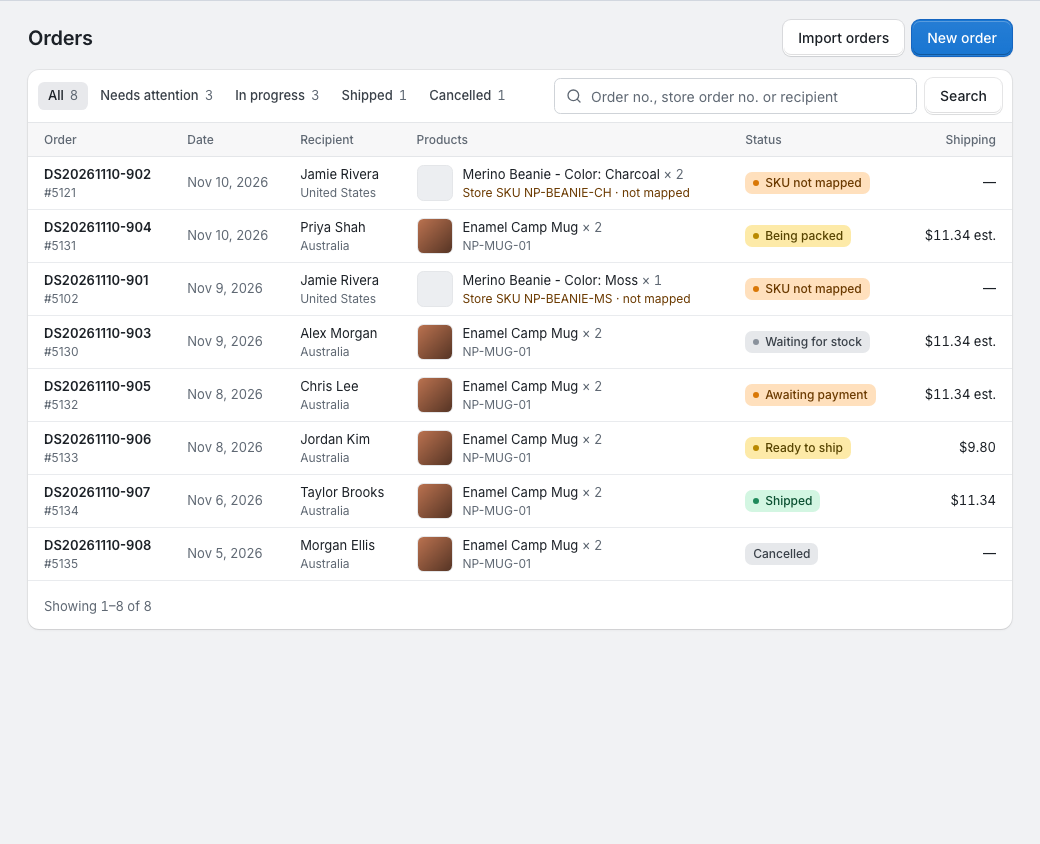
Order statuses
| Status | What it means | What you do |
|---|---|---|
| SKU not mapped, Address issue, No items, Choose a shipping option or Shipping option unavailable | The order has a problem, and the status names the first one. We don't ship it until it's fixed. | Fix it: see Fix an order. |
| Awaiting payment | Your wallet didn't cover the shipping charge when we weighed the parcel. | Top up: see When you're charged (if we released its stock, see When you're charged). |
| Ready for fulfilment | Nothing is left to fix and the order is waiting for us to reserve its stock, for example after we had to pack it again. | Nothing. |
| Waiting for stock | Some items aren't in your stock yet. We pack the order once everything is in. | Keep enough in your wallet for the missing items: see Fix an order. |
| Being packed | We've reserved the stock and set aside the shipping. | Keep enough in your wallet for the shipping charge. |
| Ready to ship | Packed, weighed and charged. | Nothing. |
| Shipped | On its way. The tracking number is on the order. | Nothing. See Shipping and tracking. |
| Fulfilled by you in your store | Shopify only: you fulfilled the whole order in Shopify before we started packing it. | Nothing. See Store orders. |
| Cancelled | We won't ship it. | Nothing. |
If an order shows Needs attention as its status, it's on hold but the portal can't tell which problem it has: please contact your account manager.
Orders from a connected store can also carry a flag about a change in your store. See Store orders.
An order's page
Open an order to see:
- Problems, while the order is on hold, with the order form to fix it. See Fix an order.
- Progress, once the order is no longer on hold: Received, Stock reserved, Packed and Shipped, with the date of each step. Cancelled orders and orders Fulfilled by you in your store have no progress.
- Items and Recipient, and details such as the store order number, the shipping option and the estimated shipping.
- Stock for this order, while it's Waiting for stock.
- Shipping set aside, while it's Being packed.
- Shipping payment due, while it's Awaiting payment (if we released its stock, see When you're charged).
- Fulfilment, from Being packed on: the Tracking number, the date it shipped, the weight and the charges, filled in once we weigh and ship the parcel.
- Store, for orders from a connected store.