Top up your wallet
You pay us with one of the payment methods on the Wallet page, then tell us about the payment. We check it and add it to your wallet.
Choose how to pay
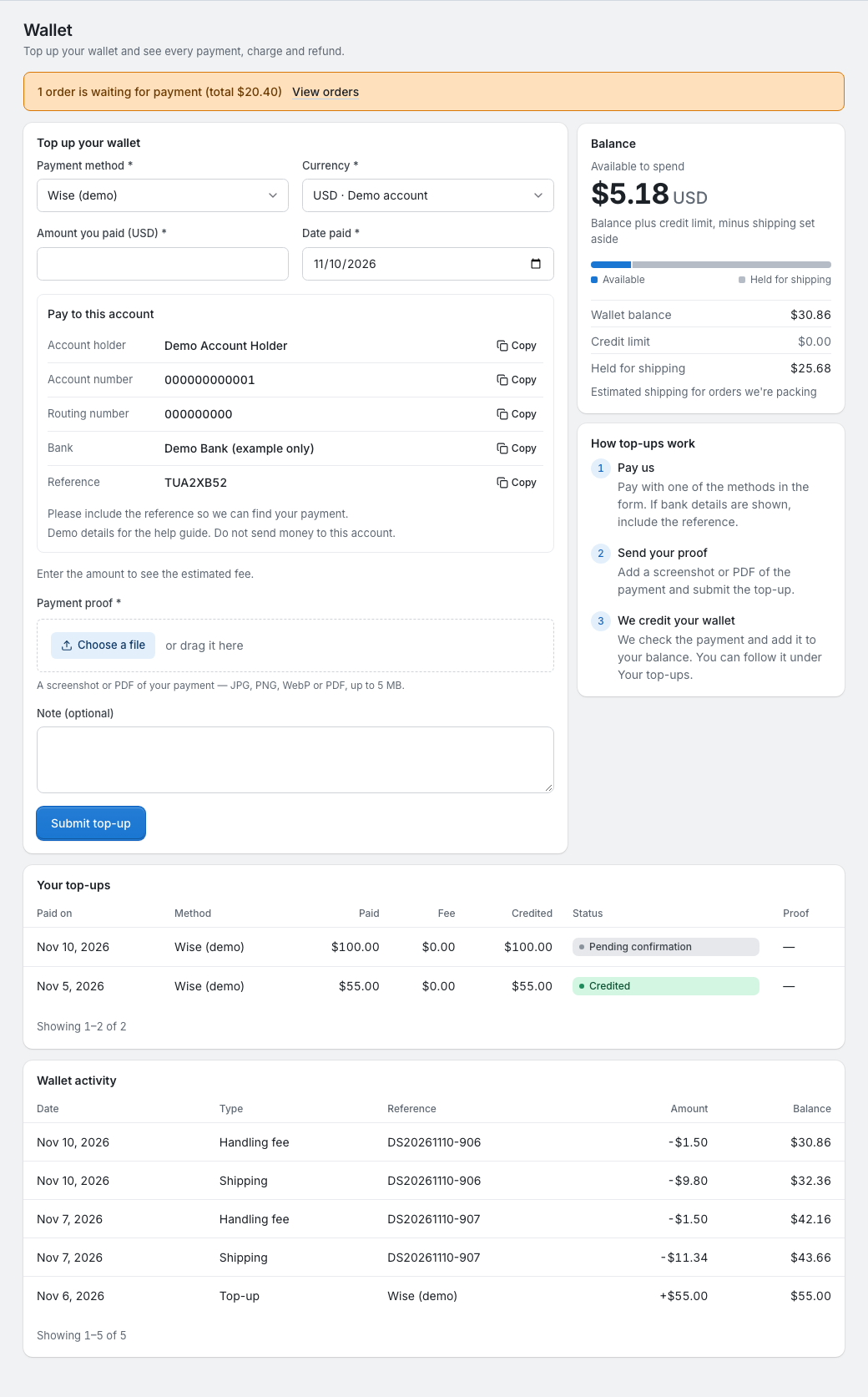
On Wallet, go to Top up your wallet and choose a Payment method. We set up the methods and the currencies you can pay in:
- A method such as a bank transfer or Wise can have an account for each currency. Currency picks the account: the form starts with the account for your country, otherwise our default account.
- A method without accounts shows how to pay with it, and you pay in US dollars.
If the form says top-ups aren't available, please contact your account manager.
Pay to the account shown
Pay to this account shows the details of the account for the currency you chose, and each row has a copy button. The last row, Reference, is your payment reference. It's the same for every top-up: "Please include the reference so we can find your payment."
Pay from your bank or your Wise account, in the account's currency. If the account shows a note below its details, follow it too.
Tell us about the payment
- In Amount you paid, enter what you paid, in the currency shown next to it.
- In Date paid, enter the day you paid. It can't be in the future.
- Under Payment proof, add a screenshot or PDF of the payment: JPG, PNG, WebP or PDF, up to 5 MB.
- Add a note if you want to, then click Submit top-up.
Each proof can be used for one top-up only. If that top-up is Not accepted or Reversed, you can use its proof again. If you submit a proof that's already used for a pending or credited top-up, the form says "This payment proof has already been used for another top-up. Please upload the proof for this payment." You can have up to 5 top-ups waiting for confirmation at a time, and upload up to 20 proofs a day.
The estimate
Before you submit, the form estimates what we'll credit:
- for an account in another currency, the value in US dollars at the account's reference exchange rate. We update these rates automatically, normally once a day;
- the fee for the payment method, if it has one;
- the estimated credit: the value in US dollars minus the fee.
It's an estimate only. When we credit the top-up, we confirm the amount in US dollars and the fee, so what we credit can differ.
After you submit
The top-up appears under Your top-ups as Pending confirmation. Your balance doesn't change yet, so you can't pay with it until we've checked it.
When we've checked the payment, its status changes and you get a notification:
- Credited: the amount is in your balance. Purchase orders that auto purchase created and that are waiting for payment are paid from it straight away, as far as it covers them (see When you're charged).
- Not accepted: the reason is shown under the status, and the top-up stays on your To do list for 30 days.
You can top up even while your account is on hold.