Quotes
A quote is our reply to a sourcing request: the products we found, their prices for your quantities, and the ways we can ship them. Your quotes are under Quotes. A quote that's waiting for you also shows under Needs your attention on Home and in your To do list, and you get a notification when we send it.
Your quotes
Your quotes lists each quote with the day we issued it, Valid until, how many products it has, the goods subtotal and its status:
| Status | What it means |
|---|---|
| Awaiting your decision | Accept or decline it before it expires. |
| Being updated | Your account manager is preparing a new version. You can't decide on this one. |
| Replaced by a newer version | We've sent a newer version; the quote links to it. |
| Accepted | You accepted it. |
| Declined | You declined it. |
| Expired | It wasn't accepted or declined in time. |
Read a quote
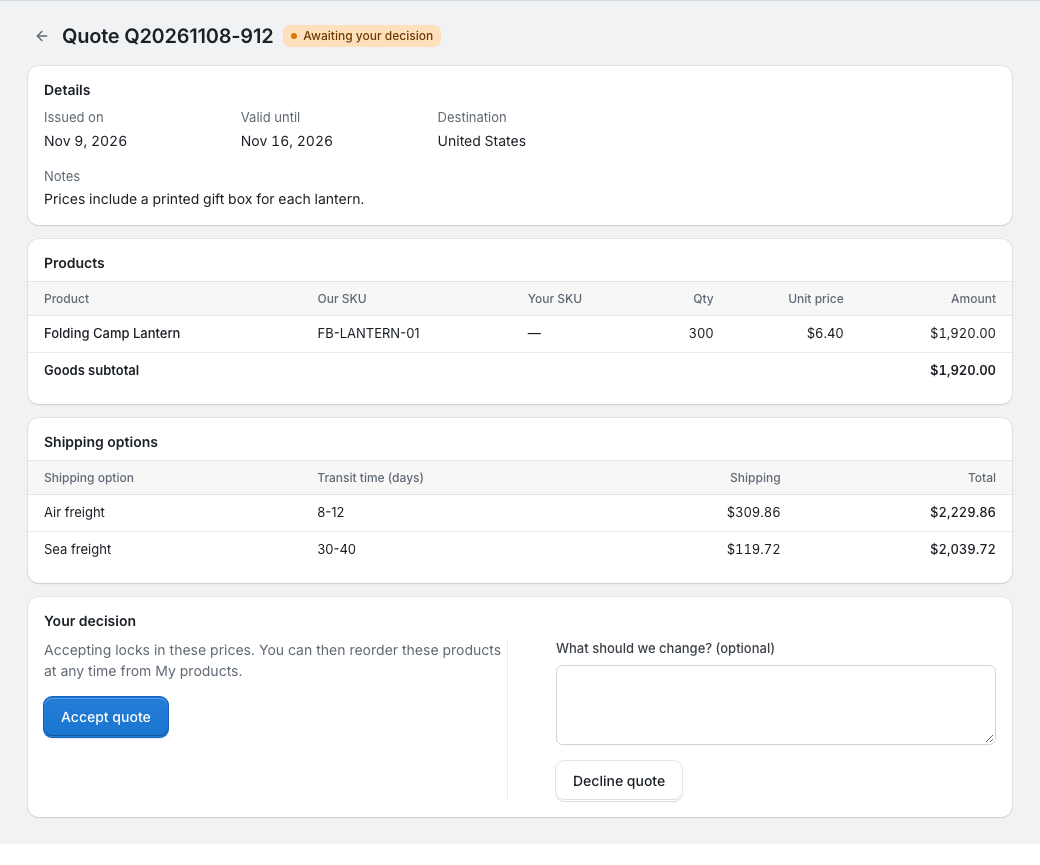
A quote shows:
- the day we issued it, Valid until, the destination and our notes;
- each product with our SKU, your SKU if you gave one, the quantity, the unit price and the amount, and the goods subtotal;
- Shipping options: the ways we can ship the goods to the destination, with the transit time, the shipping cost and the total with the goods. Where the price depends on the postcode, it's shown as a range.
Amounts are in US dollars. A quote is valid until the end of its Valid until day, China Standard Time (GMT+8).
Accept a quote
Under Your decision, click Accept quote. Accepting:
- accepts the whole quote;
- makes its prices your agreed prices: each product goes into My products at this price, replacing any earlier agreed price for it, and you can reorder it later (see Sourcing and reorder requests);
- marks the request Completed.
Accepting doesn't charge your wallet and doesn't place an order by itself. Your account manager then creates a purchase order for the goods. It appears under Purchase orders and in your To do list, and you pay it there: see Purchase orders.
Decline a quote
Tell us what should change in What should we change? (optional), and click Decline quote. Your feedback stays on the quote, the request goes back to In progress, and your account manager can send you a new version.
Expired and updated quotes
You can only decide on the latest version of a quote, while it's Awaiting your decision. Otherwise the page says "This quote can no longer be accepted or declined. It may have expired or been updated. Please refresh the page."
An expired quote can't be accepted. If you still want the goods, ask your account manager for a new version: contact your account manager.