Inventory
Inventory shows the stock we hold for you in our warehouse in China.
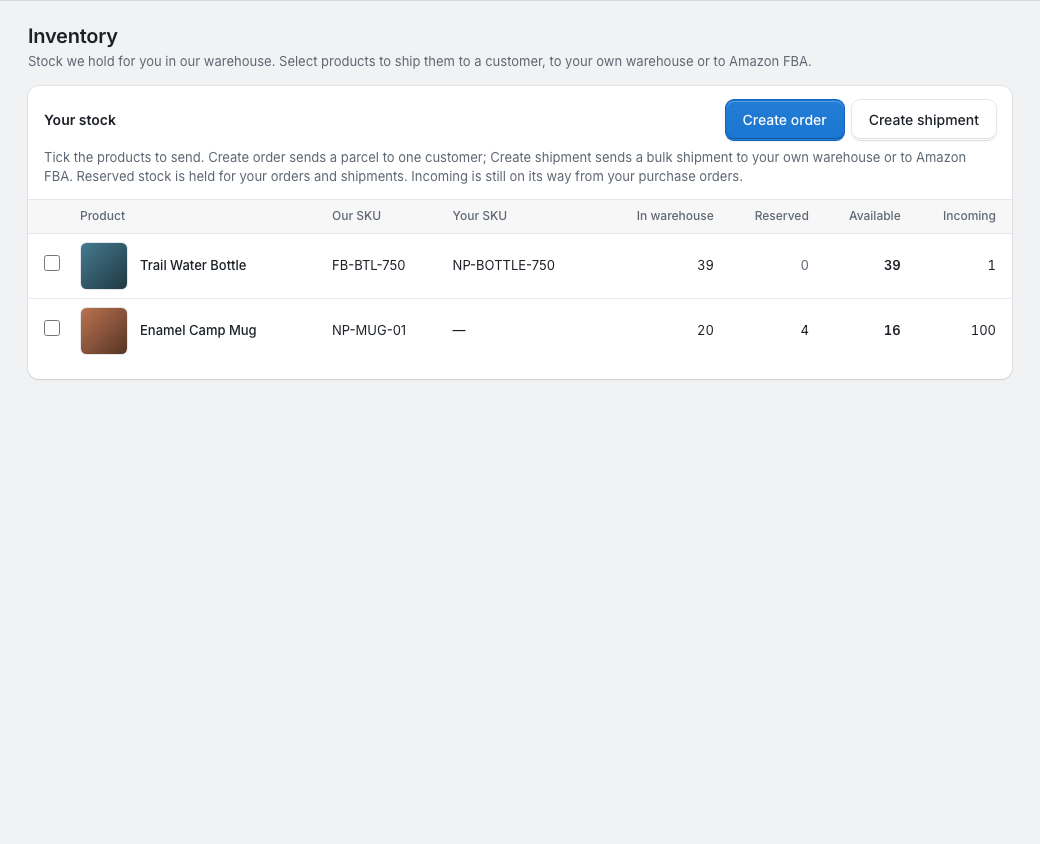
Your stock
Your stock lists every product you have in our warehouse, have reserved or have on the way:
| Column | What it means |
|---|---|
| In warehouse | Pieces we hold for you, including reserved ones. |
| Reserved | Pieces held for your dropship orders that we're packing and for your shipments. |
| Available | In warehouse minus Reserved: what new orders and shipments can use. |
| Incoming | Pieces still to come from purchase orders from Deposit received on. Pieces found short or defective still count here until we've agreed with you what to do. Purchase orders with nothing paid aren't counted here, though auto purchase counts them as already on the way (see Auto purchase). |
Rows also show our SKU, and your SKU from your quotes. Inventory doesn't list stock movements: your purchase orders, orders and shipments show what happened to the stock.
How stock arrives
- We buy the goods on a purchase order, and the supplier ships them to our warehouse. See Purchase orders.
- We check each delivery in: we count it, check it for defects and weigh it. The purchase order shows the result and photos. See Purchase orders.
- The good pieces are added to In warehouse. Defective pieces aren't.
- Orders that were Waiting for stock get their stock reserved automatically, and we start packing them. See Fix an order.
Where stock goes
- A dropship order reserves its stock once everything in it is available, and the stock leaves when the parcel ships. See Shipping and tracking.
- A shipment reserves its stock when you submit it; the stock leaves when it ships, and is available again if the shipment is cancelled. See Ship your stock.
To use your stock, tick products in Your stock and click Create order for a parcel to one customer, or Create shipment for a bulk shipment to your own warehouse or to Amazon FBA. Products with nothing available can't be ticked.