Connect your store
Connect your Shopify or WooCommerce store to Fulfillbot and you no longer export and import order files. Paid orders from your store come in by themselves, we send tracking numbers back to the store when we ship, and your store's products link to the products we fulfil for you.
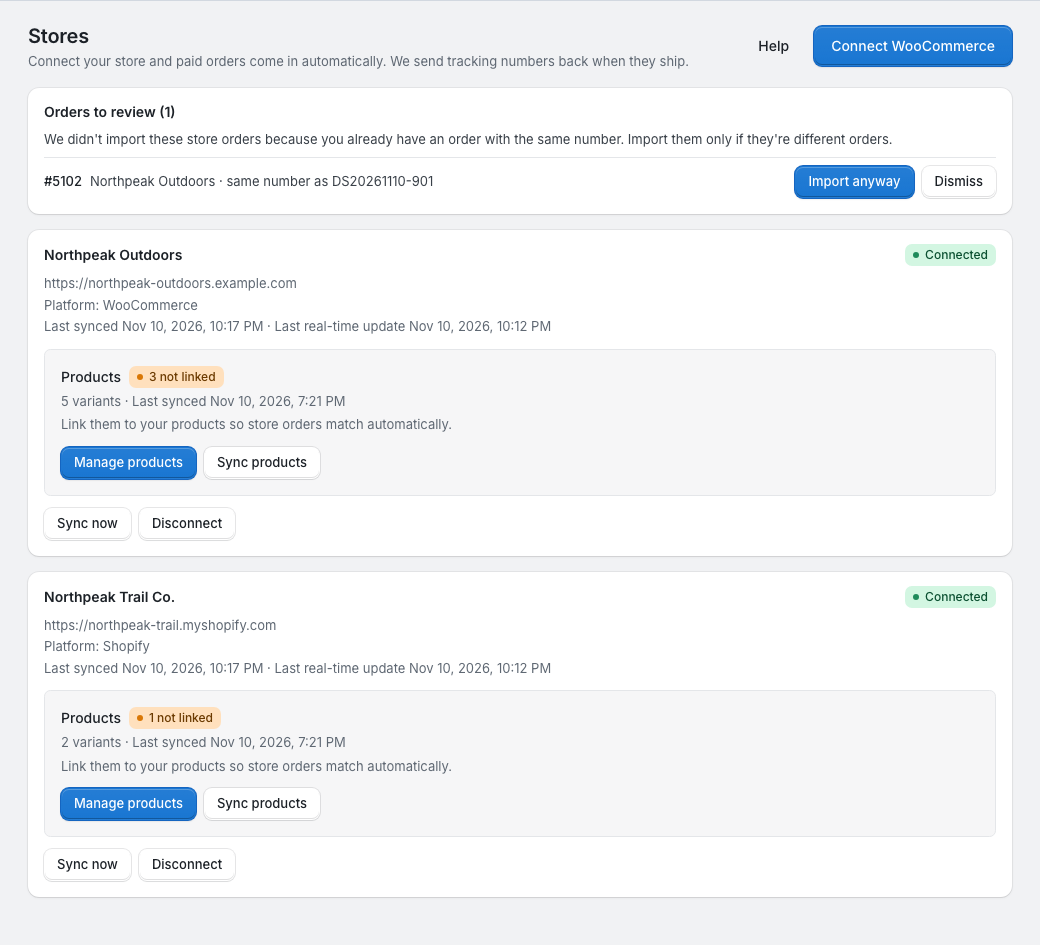
What a connection does
- Paid orders from your store appear under Orders in the portal, with your store's order number. See Store orders.
- When we ship an order, we send the carrier and tracking number back to your store.
- Your store's products and variants are listed in the portal, so you can link each one to one of your products in My products (My products). Linked products match store orders automatically. See Link your store products.
- When an order changes in your store (cancelled, new address, different items), we update the order in the portal or flag it for you.
Orders you create in the portal or import from a file work as before.
Shopify or WooCommerce
| Shopify | WooCommerce | |
|---|---|---|
| How you connect | Install our Shopify app, Fulfillbot-Dropship & Branding, then link it to your portal account | Click Connect WooCommerce on the Stores page, then authorize in WooCommerce or enter API keys |
| Orders we import | Paid or Partially refunded, and Unfulfilled | Status Processing |
| New orders arrive | Straight away: real-time updates are always on | Straight away when real-time updates are on, otherwise when you click Sync now |
| Tracking in your store | A fulfilment with the carrier, tracking number and tracking link | Through the Shipment Tracking or Advanced Shipment Tracking plugin if you have one, otherwise as an order note your customer can see; the order is then marked Completed |
| Orders you ship yourself | Fulfil the whole order in Shopify: if we haven't started packing, we close the order; otherwise we flag it | WooCommerce doesn't tell us. See Store orders |
| Reconnecting | Open the app in your Shopify admin | Reconnect in WooCommerce or Save keys on the store's card |
| Removing | Uninstall the app in Shopify, or Disconnect in the portal | Disconnect in the portal |
One store, one account
A store can be connected to one portal account only. If you try to connect a store that is already connected to another account, the portal says "This store is already connected to another account." If it's your store, contact your account manager.
You can connect several stores to one account, Shopify and WooCommerce together.
The store's card
Each connected store has a card on the Stores page with:
- its status: Connected, or Reconnect needed when the store stopped accepting our access;
- when it last synced, and when the last real-time update arrived;
- a Products block: how many store variants there are and how many aren't linked yet, with Manage products (it appears after the first product sync) and Sync products;
- Sync now, which fetches orders straight away, and Disconnect.
Above the cards, Orders to review lists store orders we held back because you already have an order with the same number. See Store orders.